Sunday, August 29, 2010

Why Windows Intune is such a big deal

Microsoft announced a few months ago a new cloud based Windows Management service known as Windows Intune.  It is currently in Beta, however the Beta is not available in Australia at this stage (at this stage MS Australia have confirmed there is no confirmed release or Beta date for Australia). 

The easiest way I can think of to explain what Intune provides, is a lightweight version of System Centre Essentials designed towards the SMB/SOHO market, where centralized IT Infrastructure is either not in place, or consists of minimal components.  The screenshot below displays the console, which gives you a good idea of what is provided:


As you'll notice, the console presents an Overview of your environment, A list of computers managed by Intune, the Updates Section, Malware Protection, Alerts, Software, Licenses, Policy, Reports and Administration. 

The centre section gives you a snapshot of the organization at a glance, letting you know whether there are any major issues in your organization. To the right we have the familiar (in recent windows versions) tasks sequence giving contextual tasks dependent upon the pane you are currently in. 

Drilling down further into the menu, we can go into the Computers section, which is shown below. 

As you can see we have a series of groups that can be created to categorize the Computers managed by Windows Intune.  By default any new computers are joined to the Unassigned Computers group until you allocate them to a new computer group.  These groups are used to manage/apply policy in a similar fashion to Organizational Units in Active Directory.  The overview tab which is not shown above, provides a quick snapshot of the general health of each managed computer. 

If you continue drilling down into the individual computers you are presented with detailled information about each of the sections that Windows Intune manages.  In addition to these you are presented with a Hardware and Software tab.  The Software tab provides you with a list of all installed applications on the computer (handy to see if your user has decided to install 1001 screensavers).  The Hardware tab provides detailled hardware information, from Motherboard to firmware to printers which is exceptionally useful when troubleshooting hardware related issues.

Next down, we have the Updates tab which is very familiar to those of you who have used Windows Server Update Services in your client organization.  Below I have screenshots of the Updates screen when an update is pending approval, and the standard (all updates taken care of) view.


You'll notice in the first screenshot there is an option to approve the pending updates, where you would select which computer groups these updates need to apply to.  Again, very similar to the standard WSUS screens you are probably familiar with.  An important note to consider is that updates are downloaded from the Microsoft Update Service - which has bandwidth considerations if you are using InTune in addition to an on premises WSUS.  Microsoft have confirmed that Group Policy overrides InTune Policy, so if you apply WSUS local updating policies these will take precedence.

Continuing down the console, we have the Anti-Malware section, I have taken screenshots of the Anti-Malware section when a virus is found on a client machine. 


As you'll notice the interface is pretty basic, providing you with the details of any malware found on managed machines and a brief overview of the threat severity.  What is really cool is the ability to click on the name of the threat (or the "Learn More:") link, and you will get a Forefront Threat description with information about the threat (see below)


Note that I was unable to find a way of remotely cleaning up the threat, however at least you are notified that the threat exists.  I would imagine that future Beta versions will include this functionality as it seems fairly trivial to implement.

Next we have the Alerts section, which provides a snapshot of all active Alerts in the system.  From within this section you are able to view any informational alerts (such as information to let you know how to install client software) or critical alerts (such as malware found) and the ability to close these once they have been resolved.  The section is fairly self explanatory but comprehensive in the areas of the client that it covers.  Screenshot below.


The next section is software which is also reasonably basic, it simply provides you with a list of all software installed on the computers within your organization.  You can see the number of computers the software is installed on, as well as the author & publisher information (the usual stuff).
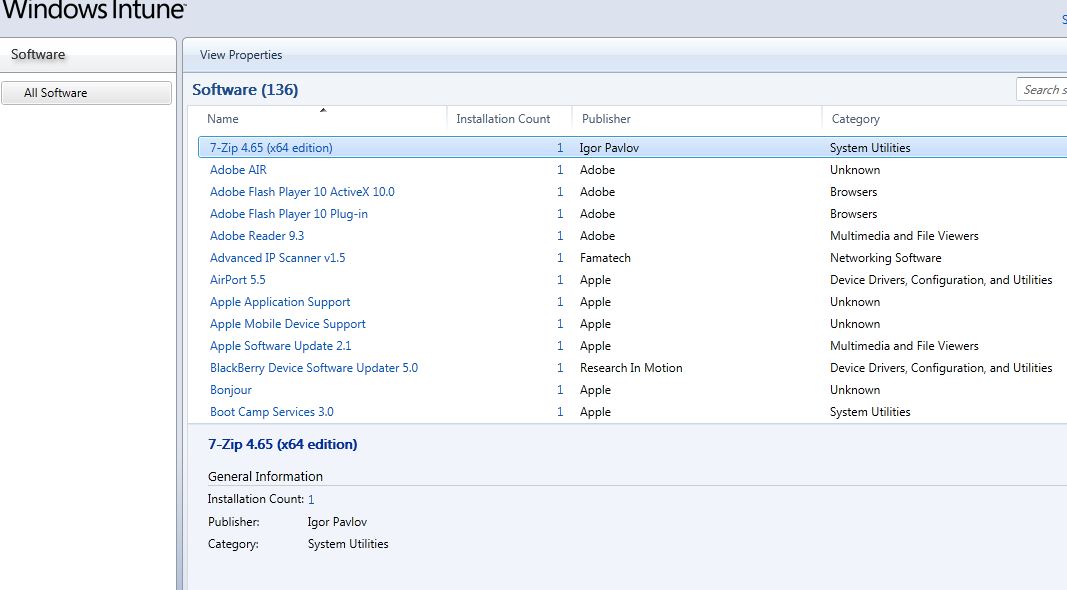


Continuing down, we have the Licenses section - this is quite a nifty feature for smaller organizations to keep track of their software compliance. Again at this case it's fairly basic, you can currently upload Microsoft Volume Licenses here (add the Agreement/Authorization number) which allows you to keep track of numbers. This is the information used in the next section around Reporting on compliance.


We then continue to the Policy section which can be thought of as the Intune version of Group Policy.  At this stage we have the ability to apply policy around the Intune Client, the Anti-Malware Agent and the Windows Firewall.  These policies are applied to Computer Groups exactly as you would expect.  Again the implementation seems pretty basic at this stage but it shows what can be done and I would imagine that future versions of Intune should allow you to apply other policy settings to your clients.  I absolutely love this concept of remotely managed Group Policy for all.


Second from last we have the Reports section which provides a useful area which consolidates all aspects of reporting into the one section.  Here we can generate reports on the Update Status, Installed Software and License Reporting.  Each has multiple types of report that can be generated and these are quite handy for generating paperwork for your managed clients (to show them the work you do for them!).


Finally we have the Administration pane where you can configure various aspects of your client management. 
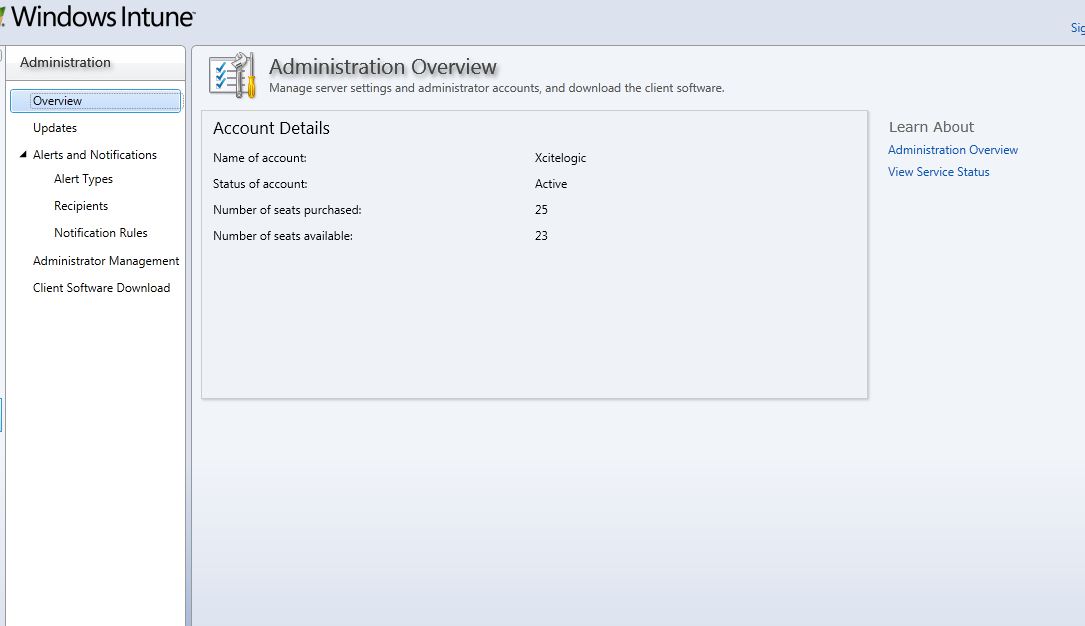


The updates section (screenshow below) allows you to configure what types of update are available for installation on your client machines (ie. the product categories, and update types).  You can also configure Automatic Approval settings to ensure that your clients automatically receive critical updates without administrative approval.


We can then configure Alerts for your managed clients and whether these are enabled.  In addition you can configure recipients to be notified when an Alert event has been triggered as well as what events actually trigger an email (and what purely triggers a console alert).


The remaining two administration sections simply cover the authorized Intune administrators (and their associated Live ID's).  These are known as Service Administrators, although at this stage I have yet to see exactly what these differences constitute.

This year I was extremely lucky to be able to attend TechEd Australia 2010 where Jeff Alexander and his fellow presenter (terribly sorry I've forgotten his name) gave us an excellent demonstration of the User Interface and were able to provide us with some interesting information around the product. 

The beauty of this product is the ability to manage workstations irrespective of where they are currently located.  No special firewall rules required, it's all client initiated polling, and communicates over SSL (so as long as their internet connection allows outbound web traffic they can be managed. 

@nathanm was kind enough to let me know that Remote Assistances is also provided via Windows Intune which was one of the key features I had originally thought missing.  It's called Windows Easy Assist and is implemented via Live Meeting.  It supports Full Desktop Sharing, Single App Sharing, the ability to record & replay, file transfer and the ability to reboot/reconnect, which is great. Taking this into account the product begins to look increasingly polished and any feature changes would be relatively minor.

Australian pricing is not ready, in the same way the beta is not currently ready, however indicative american pricing suggests that we will be looking at around $10US per month per client, with an additional $1US per month for the Microsoft Desktop Optimization Pack.  The cool thing about this cost though, is that it actually entitles you to upgrade every single computer managed by the product to Windows 7 Enterprise.  And that extra $1 US per month gives you the rights to use all of the MDOP products.  That to my mind is pretty awesome, and the price is inline with the numbers Telstra are currently providing for hosted BPOS.  It may well be that pricing will be different when the product is released, but the power & management provided by the product justifies that pricepoint in my mind.

We're still unsure of the release date, however initial suggestions from MS were some time next year.  We are assured that by the time the next TechEd comes around we will be talking about this product more and more. 

Personally I'm excited by the product and can't wait to get my hands on the Australian beta as soon as it comes out and follow the product to completion.  I can't deny that there are other products out there that cover this market, however when Microsoft put their minds to something they tend to produce a winner.  They have made a serious commitment to the cloud and I think this product will be one of their flagship SMB products moving forward.  Especially when you consider this product in conjunction with BPOS and "Aurora" (the new SBS Light).

Exciting times ahead people, definitely keep your eyes and ears open for Windows InTune, it's going to be massive.

Sunday, July 25, 2010

ShadowProtect ImageManager Enterprise Licensing Error

Came across an interesting error today when attempting to Enter the license information for ShadowProtect Image Manager Enterprise (4.0).

To configure a license, you simply load Image Manager, click on Agent Settings, then select the Licensing Tab, and choose Activate.  When you enter your licensing information, I was getting the following error:
"The constructor to deserialize an object of type 'StorageCraft.Licensing.LicensingException' was not found."

Turns out there is a relatively simple fix for this, you can simply obtain an updated licensing.dll from StorageCraft, via this KB: http://www.storagecraft.com/kb/questions.php?questionid=240

Basically, all you have to do is Stop the StorageCraft ImageManager Enterprise License server, rename the old licensing.dll file from the %program files%\StorageCraft\ImageManager directory, place the new licensing.dll file in there, and then restart the services.

Voila, you can now enter the updated license information and your product will activate.  What's interesting is that you can't find this out by "googling" for the answer, as the KB in question doesn't actually contain any serchable text.  Hopefully this should start showing up in search results and save you guys a bit of time next time!

Cheers

Thursday, July 22, 2010

PracticeWorks Update (7.0.13.185)

Just a quick one here, I've been battling for the last few hours with an update to the PracticeWorks Software.  Long story short I've figured the upgrade process out, it's a little different from the documented steps.

1. Perform the Pervasive SQL 10 SP3 update (from Autorun menu) on PWORKS server
2. Restart PWORKS server
3. Install PWorks update on server
4. Run through PWorks client install (part of the same install)
5. Rename the WSetup folder in your PWORKS data folder (say WSetup-olddate)
6. Copy the WSetup folder from your C:\PWORKS folder (this assumes data directory is different from install directory)
7. Launch PWorks on a client workstation
8. You're going to be told that you should not run different versions of BTRIEVE
9. Continue, then you'll be prompted to update the installation of PWorks
10. It will detect that Pervasive SQL is out of date, allow it to update
(Note at this point I kept getting told there was another copy open, when there wasn't on the network, so I just ignored the error)
11. Restart workstation
12. Run PWorks again, and choose Yes to update
13. When the upgrade has finished, you should be able to launch PWorks.

More notes to come after I work out the HICAPS updates a little better

Monday, July 12, 2010

Finding "illegal" filenames within *nix/OSX

So, this might seem quite obvious to some, but it took me a bit of searching and manual reading to work out.

Say I'm preparing a Mac File Share to copy over to a Windows File Share... In the process I know that Mac allows a bunch of characters that are illegal within Windows (such as * ? / \ | etc...).  What I want to do is track down every filename/directory that is going to cause my file copy to fail.

So the obvious command would be something along the lines of:

find . -name \\
when I want to find a filename with a \ in it.  OK fair enough this works fine.for most of those characters.  However I found that when I used ? or * in the search path, I regularly got returned results that I was not expecting (ie. All files/folders or Single Character files)... So whats the trick?  Really really simple, just use an extra \ to escape the search term.  So for example:

find . -name \*\\*\* will find any filename with a * in it.  Simple, but frustratingly difficult to discover!

Hope that helps someone a bit of time in future

Saturday, July 10, 2010

Windows 7 Network Adapter Ordering

Anyone else noticed that Windows 7 for some reason seems to ignore Network Adapter Ordering?  At work we explicity block our Wireless Subnet from traversing our VPN's to reach clients sites.  My ordering says that LAN takes higher priority than Wireless, yet if I have Wireless turned on, it takes precedence. 


As you can see the LAN NIC has a higher priority yet I can 100% confirm that the Wireless NIC always takes priority.  It's not the end of the world, i can disable the Wireless Adapter (& have been doing so) but I have to wonder if this is going to find itself fixed with SP1.

On another side note, I find myself needing to disable/reenable NIC's on a regular basis.  It seems to happen when the workstation is perpetually put in sleep mode when switching between multiple sites.  Again, not the end of the world, just a minor annoyance.  Symptoms are usually: awake from sleep, and can't obtain a lease.  Disable/Reenable and voila the lease is obtained (interestingly an ipconfig /release and ipconfig /renew still fails to obtain a lease until the NIC is disabled/enabled).

Access 2003 Runtime vs Win 7 and Office 2007

One of the beauties of taking on a new client at work, can be the legacy environment you inherit when you start. In this case, I had a customer who we were providing brand new infrastructure for (new server, several new worksations and a new SOE). As part of that process, we made the transition from Windows XP to Windows 7, and Office 2003 to Office 2007.

I did due dilligence and checked up on their workflows, and apart from the obvious bout of training on how to use the new versions of the products, all looked like it was going to be reasonably smooth. They had a Line of Business custom app which was written with Access 2003 in mind, however after reading up on Sandboxing, I figured I could get it going no problems. My internal testing seemed to indicate the App ran as expected, and unfortunately as they were located in another state, my UAT was somewhat limited to "Does the app load, and look normal", which I concluded was yes.

Long story short, did the rollout and the customer was very happy with the results.

However, a few weeks after the fact, when the client had a chance to settle in, and get back to normal operations, I was informed that a few functions within the LOB app were not working as expected, namely Invoice Generation and Date Field entry (strange I know, but it hadn't been noticed till that point).

At this point, naturally you get back in contact with the developer, however as is often the case with these custom apps, they had long since moved on from the original product and had never intended the application to be run on this platform. The developer did mention that there were problems with references when going from 2003 to 2007, especially when installed on the same machine, and particular problems around Sandboxing on Win Vista++.

By this stage, I had already figured out that in order for the App to work as I was expecting, I needed to Add/Modify the following keys:

[HKEY_LOCAL_MACHINE\SOFTWARE\Microsoft\Jet\4.0\Engines]
"SandBoxMode"=dword:00000002

and

[HKEY_LOCAL_MACHINE\Software\Microsoft\Office\11.0\Access\Security]
"Level"=dword:00000001
I had to do this, to get the App to properly launch (as it was not digitally signed) in the first place.
When I first heard about the problem, I jumped onto a reference computer, and spent hours trying to figure out what tweak was required to get these references correct. As you can imagine, it's a difficult term to search for, and I got a great deal of responses bemoaning a migration from XP->Vista, or 2003->2007 but not a great deal of help. After a few hours of tinkering, I resigned myself to wait for a call from the developer to see if we could get this sorted out.
Lo and behold, about a week later, the client called me to let me know that the reference machine was working exactly as expected, and to thank me for what I had done. Problem was, I know it wasn't working when I left it that night!
Another few hours doing Registry Diff's, and checking for any custom config that had occurred, the only thing I could note was a difference in file versions for Access 2003 on the workstation. Eventually it dawned on me, Ofice 2003 SP3 had applied, even though I was only running the Access 2003 runtime. A test run on another machine in the office, and I could confirm that the app was working exactly as expected.
I'm not 100% certain what the Service Pack took care of, but I know the list of fixes is huge. My advice to anyone experiencing a problem porting a 2003 app to Windows 7/Office 2007 is to check your service packs (and note the sandboxing/security settings above) and you should be all good.

Sunday, July 19, 2009

An interesting bug/feature with SMB on OSX 10.5

So i'm not a Mac guy, by any stretch of the imagination, but my role forces/encourages me to get to know a bit about Mac. I have several sites that I look after who have a combination of Mac workstation & servers.

One of my sites has an OSX web server, which we recently upgraded to 10.5 (used to run 10.4). This operates in a DMZ and runs 10.5's included version of apache, plus a custom app written in Python. It's custom configured to take web requests via the front end, "pickle" these requests (a python term for dumping the request, compressed, to file). These are then dropped to a polling directory, which is then picked up by an internal server, validated, etc... and processed.

Since the upgrade to 10.5 we've been getting pickling errors, stating that the file (as polled) does not have a valid EoF. After a bit of investigation, we realised that the polling process on the internal network was accessing files whilst they were still in use by the python process on the front end server. Long story short, we worked around it by generating the pickle and once complete copying to the polling directory... I digress.

This got us to thinking... how come we weren't getting a lock, or at least notified that the file was in use/locked. We checked and the appropriate locks were applied on the SMB share (ie. Strict File Locking). So we tested, and found that we could have a file shared via SMB on OSX 10.5(.6) open on several computers simultaneously, with no FLock notification, and in fact could modify & save varying versions of the file, with a "last save wins" policy.

This applied to opening standard text based files with a text editing utility. Interestingly enough, if you use a program that performs it's own file locking checks (ie. Microsoft Excel) - it worked out (eventually) that a file was open. We had several interesting issues, like we could sometimes have both clients open the file at the same time, and neither be marked as read only, or both marked as read only, and sometimes allowed to save. A very strange behaviour to be sure, but the Text Edit/Multiple Edit stuff really worries me.

We've put in a call to Apple, and some apple contacts to see whats going on, will keep up to date on how we go with this.